
Introduction
With Windows 7, everyone who uses your computer can have their own user account. This allows each person to have his or her own settings, and it allows you to set up Parental Controls to limit the types of games and programs your children are able to use.
In this lesson, you will learn how to create new user accounts, change account settings, and set up Parental Controls for your children’s accounts.
Setting up multiple user accounts
Why should you have multiple user accounts?
If you wanted to, you could have a single account on your computer that everyone could use. But having multiple accounts has some advantages. If each user has his or her own account, then each person will have his or her own desktop for organizing files and folders. Each person also will be able to choose a specific desktop background, along with other personalization features. In addition, parents will be able to set Parental Controls for each child’s account.
Standard vs. administrator accounts
Before you start making new user accounts, it’s important to understand the two types of accounts:
- Standard: Standard accounts are the basic accounts you use for normal, everyday tasks. As a Standard user, you can do just about anything you would need to do, such as running software or personalizing your desktop. Also, Parental Controls can be placed on Standard accounts.
- Administrator: Administrator accounts are special accounts that are used for making certain changes to system settings or managing other people’s accounts. They have full access to every setting on the computer. Every computer will have at least one Administrator account.
As you can see, Administrator accounts are more powerful. But for the same reason, Standard accounts are safer, so they are generally better for everyday use. In fact, you can make Administrator-level changes while logged into a Standard account; you will just need to provide an Administrator password when making the changes.
To go to your user accounts:
- Go to the Control Panel from the Start Menu.
- Click Add or remove user accounts.

- The Manage Accounts pane will appear. You will see all of the user accounts here, and you can add more accounts or manage existing ones.

To create a new account:
- From the Manage Accounts pane, click Create a new account.
- Type an account name.

- Select Standard user or Administrator.
- Click Create Account.
Page 2
Changing an account’s settings
Once you’ve created a new account, you may want to add a password or make other changes to the account’s settings.
To create a password:
- From the Manage Accounts pane, click the account name or picture.

- Click Create a password.

- Type a password in the New password field, and retype it in the Confirm new password field.

- If you want, you can type a password hint to help you remember your password.
- Click Create password.
- To go back to the Manage Accounts pane, click Manage another account.
Account passwords are case sensitive, which means capital and lowercase letters are treated as different characters. For example, aBc1 is not the same as abc1.
To change your account picture:
You can also change the picture for any account. This picture appears next to the account name and helps you easily identify the account.
- From the Manage Accounts pane, click the account name or picture.
- Click Change the picture.

- Select a picture, or click Browse for more pictures to select one of your own.

- Click Change Picture.
Page 3
Using Parental Controls

Windows 7 offers various Parental Controls to help you control the types of content your children can access. You can place parental controls on any Standard account, and each account can have different settings. If you have more than one child, each child can have access to different types of content, and you can always change the Parental Controls settings as your children get older.
Learn more about Parental Controls in this video.
Before you set up Parental Controls
You’ll need to create an account for your child, if you haven’t already. It should be a Standard account; you cannot apply Parental Controls to an Administrator account.
When you’re setting up Parental Controls, it doesn’t matter which account you’re logged in to, but if you’re logged in to a Standard account you’ll need to provide an Administrator password before making any changes.
Make sure your children do not know your Administrator password, as it would allow them to change or disable Parental Controls for any user account.
To set up Parental Controls
- Go to the Control Panel from the Start Menu.
- Click Set up parental controls for any user.

- Click on any Standard Account.

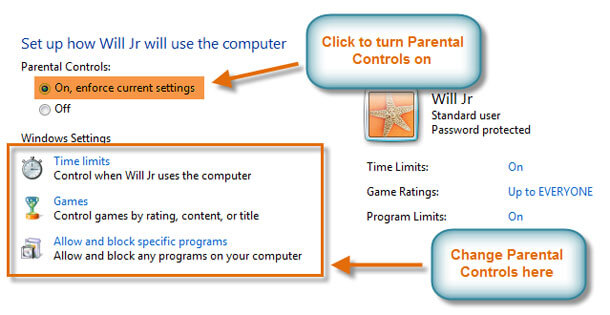
- Click On to turn Parental Controls on.

- Now you can click Time limits, Games, or Allow and block specific programs to set the Parental Controls. We’ll explore each of these on the next page.
To learn more about available parental control options you can use, check out this article on Five Free Ways to Protect Your Kids Online.
Page 4
Changing your Parental Controls settings
Time limits
The time limits settings allow you to control when your children can use the computer. Click and drag from any box to allow or block a section of time. If you want, you can set different time limits on different days. For example, you may want to allow more computer use on weekends.

Games
The Games settings allow you to select which game ratings to allow, and you can also allow or block specific games. First, you’ll have to click Yes to allow your children to play games, then you can change your Games settings.

Here, we have selected “Everyone” as the highest rating allowed. This means your children can play games rated “Everyone” OR “Early Childhood.”

To allow or block specific programs:
Allow and block specific programs controls which nongame programs your children can use. By default, your children can use all nongame programs. But there may be some programs you don’t want your children to use, like a financial or email program. Here’s how to block specific programs:
- Click Will Jr can only use the programs I allow.
- Click Check All.
- Uncheck the programs you want to block.

Page 5
Conclusion

You can now create new accounts whenever you want, and all users will be able toeasily access their own files and customize the appearance of Windows 7 while they’re logged in to their respective accounts.
If you’re using Parental Controls, take the time to familiarize yourself with the different controls offered. Windows 7 gives you a lot of flexibility when using Parental Controls, so you can apply them with as much or as little detail as you want.
You could also read more on other effective controls and tools here.
This article is brought to you courtesy of GCFLearnFree. Original source article can be found here
3Z1D5vbcPT8
Your point of view caught my eye and was very interesting. Thanks. I have a question for you.
Thanks for sharing. I read many of your blog posts, cool, your blog is very good.
Your point of view caught my eye and was very interesting. Thanks. I have a question for you.
Thanks for sharing. I read many of your blog posts, cool, your blog is very good.
Your point of view caught my eye and was very interesting. Thanks. I have a question for you.
Thank you for your sharing. I am worried that I lack creative ideas. It is your article that makes me full of hope. Thank you. But, I have a question, can you help me?
Thanks for this super helpful guide! It’s amazing how Windows 7 makes it so easy to manage multiple users and keep kids safe online. The step-by-step instructions for creating accounts and setting up Parental Controls are especially useful – I never knew you could set time limits by dragging those time blocks!
The tip about Administrator vs Standard accounts is great too. Definitely saving this for when I help my parents set up their computer for my younger siblings. Maybe next you could do a similar guide for Windows 10/11?
Your point of view caught my eye and was very interesting. Thanks. I have a question for you. https://www.binance.com/fr/join?ref=S5H7X3LP
I don’t think the title of your article matches the content lol. Just kidding, mainly because I had some doubts after reading the article.
Your article helped me a lot, is there any more related content? Thanks!
Thanks for sharing. I read many of your blog posts, cool, your blog is very good.
Your article helped me a lot, is there any more related content? Thanks!
Can you be more specific about the content of your article? After reading it, I still have some doubts. Hope you can help me.
Your point of view caught my eye and was very interesting. Thanks. I have a question for you.
**mindvault**
mindvault is a premium cognitive support formula created for adults 45+. It’s thoughtfully designed to help maintain clear thinking
Your point of view caught my eye and was very interesting. Thanks. I have a question for you.
**neuro sharp**
neurosharp is a high-quality cognitive support formula made to elevate memory, attention, and overall mental performance.
**sugarmute**
sugarmute is a science-guided nutritional supplement created to help maintain balanced blood sugar while supporting steady energy and mental clarity.
**glpro**
glpro is a natural dietary supplement designed to promote balanced blood sugar levels and curb sugar cravings.
**prodentim**
prodentim an advanced probiotic formulation designed to support exceptional oral hygiene while fortifying teeth and gums.
**mitolyn**
mitolyn a nature-inspired supplement crafted to elevate metabolic activity and support sustainable weight management.
**synaptigen**
synaptigen is a next-generation brain support supplement that blends natural nootropics, adaptogens
**zencortex**
zencortex contains only the natural ingredients that are effective in supporting incredible hearing naturally.
**yu sleep**
yusleep is a gentle, nano-enhanced nightly blend designed to help you drift off quickly, stay asleep longer, and wake feeling clear.
**glucore**
glucore is a nutritional supplement that is given to patients daily to assist in maintaining healthy blood sugar and metabolic rates.
**wildgut**
wildgutis a precision-crafted nutritional blend designed to nurture your dog’s digestive tract.
**breathe**
breathe is a plant-powered tincture crafted to promote lung performance and enhance your breathing quality.
**energeia**
energeia is the first and only recipe that targets the root cause of stubborn belly fat and Deadly visceral fat.
**boostaro**
boostaro is a specially crafted dietary supplement for men who want to elevate their overall health and vitality.
**pinealxt**
pinealxt is a revolutionary supplement that promotes proper pineal gland function and energy levels to support healthy body function.
**prostabliss**
prostabliss is a carefully developed dietary formula aimed at nurturing prostate vitality and improving urinary comfort.
**potent stream**
potent stream is engineered to promote prostate well-being by counteracting the residue that can build up from hard-water minerals within the urinary tract.
**hepato burn**
hepato burn is a premium nutritional formula designed to enhance liver function, boost metabolism, and support natural fat breakdown.
**hepatoburn**
hepatoburn is a potent, plant-based formula created to promote optimal liver performance and naturally stimulate fat-burning mechanisms.
**cellufend**
cellufend is a natural supplement developed to support balanced blood sugar levels through a blend of botanical extracts and essential nutrients.
**prodentim**
prodentim is a forward-thinking oral wellness blend crafted to nurture and maintain a balanced mouth microbiome.
**flow force max**
flow force max delivers a forward-thinking, plant-focused way to support prostate health—while also helping maintain everyday energy, libido, and overall vitality.
**revitag**
revitag is a daily skin-support formula created to promote a healthy complexion and visibly diminish the appearance of skin tags.
**neurogenica**
neurogenica is a dietary supplement formulated to support nerve health and ease discomfort associated with neuropathy.
**sleeplean**
sleeplean is a US-trusted, naturally focused nighttime support formula that helps your body burn fat while you rest.
**memory lift**
memory lift is an innovative dietary formula designed to naturally nurture brain wellness and sharpen cognitive performance.
Thanks for sharing. I read many of your blog posts, cool, your blog is very good.
Thank you for your sharing. I am worried that I lack creative ideas. It is your article that makes me full of hope. Thank you. But, I have a question, can you help me?
Thank you for your sharing. I am worried that I lack creative ideas. It is your article that makes me full of hope. Thank you. But, I have a question, can you help me? https://www.binance.info/register?ref=IXBIAFVY
Thanks for sharing. I read many of your blog posts, cool, your blog is very good.
I don’t think the title of your article matches the content lol. Just kidding, mainly because I had some doubts after reading the article. https://accounts.binance.com/pl/register?ref=UM6SMJM3
**boostaro**
Boostaro is a purpose-built wellness formula created for men who want to strengthen vitality, confidence, and everyday performance.
Your article helped me a lot, is there any more related content? Thanks! https://www.binance.com/register?ref=IHJUI7TF
Những tựa game đối kháng P2P tại 888SLOT luôn thu hút đông đảo cao thủ. Hãy thử sức ngay để khẳng định bản lĩnh và mang về tiền thưởng lớn. TONY03-11O
gdzie można kupić prawo jazdy z wpisem do rejestru, gdzie kupić prawo jazdy, jak kupić prawo jazdy, w jakim kraju można kupić prawo jazdy, gdzie kupić prawo jazdy kat b, jak kupić prawo jazdy na lewo, jak kupić prawo jazdy w polsce, gdzie można kupić prawo jazdy, prawo jazdy kupno, jak kupic prawo jazdy kat b, gdzie mozna kupic prawojazdy, czy można kupić prawo jazdy, prawo jazdy bez egzaminu, legalne prawo jazdy do kupienia, kupie prawo jazdy, kupię prawo jazdy z wpisem, prawo jazdy do kupienia, gdzie można kupić prawo jazdy, gdzie można kupić prawo jazdy z wpisem do rejestru forum, gdzie można kupić prawo jazdy b legalne, europejskie prawo jazdy bez egzaminu, kupic prawo jazdy w polsce, kupienie prawa jazdy, kupię prawo jazdy, jak załatwić prawo jazdy na lewo, prawo jazdy kupie, kupię prawo jazdy, legalne prawo jazdy do kupienia, jak kupic prawo jazdy kat b, sprzedam prawo jazdy z wpisem bez zaliczek, prawo jazdy do kupienia, gdzie mozna kupic prawojazdy, europejskie prawo jazdy bez egzaminu, legalne prawo jazdy do kupienia, kupno prawa jazdy, Gdzie Kupić Prawo Jazdy Legalnie?
jhb
comprare patente b, e legale comprare la patente, comprare una patente napoli, patente originale, comprare patente c, acquisto patente b, comprare patente prezzo, compro patente, acquistare patente b napoli, dove posso comprare la patente b, compra patente online, comprare patente b online, comprare la patente a napoli, dove si può comprare la patente, quanto costa comprare la patente, comprare patente di guida, comprare patente senza esame, patente comprata prezzo, come comprare patente b napoli, comprare patente a, patente online comprare, quanto costa la patente a napoli, comprare patente Nautica, patente da comprare, Comprare patente Napoli . Comprare patente registrata presso Motorizzazione civile (DMV)?
hbv
Your blog is like a breath of fresh air in a sea of negativity and pessimism Thank you for being a source of light and hope
th of fresh air in a sea of negativity and pessimism Thank you for being a source o
online comprare, quanto costa la patente a napoli, comprare patente Nautica, patente da comprare, Comprare patente Napoli . Comprare
online comprare, quanto costa la patente a napoli, comprare patente Nautica, patente da comprare, Comprare patente
Khám phá thế giới giải trí không giới hạn tại slot365 app . Từ slot cổ điển đến video slots hiện đại, tất cả đều có tỷ lệ hoàn trả cực cao. TONY04-17
Unquestionably believe that which you said. Your favourite justification seemed to be
on the net the easiest factor to understand of. I say
to you, I certainly get irked whilst people consider concerns that they just do not know about.
You managed to hit the nail upon the highest and outlined
out the entire thing without having side-effects , other people
could take a signal. Will probably be again to get more. Thank you
it the nail upon the highest and outlined
out the entire thing with
comprar carnet de conducir
striker cars for sale
thc gummies
thc pen
thc pens
Thc vape
Rolex Submariner
hrerschein kaufen
Tại slot365 app , sự minh bạch trong quy trình nạp rút tiền là kim chỉ nam cho mọi hoạt động vận hành của chúng tôi. Quý khách có thể thực hiện giao dịch thông qua đa dạng các phương thức từ ngân hàng nội địa đến các ví điện tử phổ biến nhất hiện nay. TONY05-15
I’m gone to tell my little brother, that he should also go to see this website on regular basis to take updated from hottest news update.
When I originally left a comment I appear to have clicked on the -Notify me when new comments are added- checkbox and from now on each time a comment is added I get 4 emails with the same comment. Is there a means you are able to remove me from that service? Thanks!
Your point of view caught my eye and was very interesting. Thanks. I have a question for you. https://www.binance.com/register?ref=IHJUI7TF
Thank you for your sharing. I am worried that I lack creative ideas. It is your article that makes me full of hope. Thank you. But, I have a question, can you help me? https://www.binance.bh/register?ref=GGYHGRE
Nạp tiền qua ví điện tử tại slot online nhận thêm 5% giá trị mỗi lần nạp. Khuyến mãi áp dụng xuyên suốt dành cho tất cả thành viên. TONY06-16
Giao diện 66B được thiết kế responsive – co giãn tự động theo kích thước màn hình, đảm bảo trải nghiệm mượt mà trên iPhone, Android, iPad hay laptop. TONY07-05
Your point of view caught my eye and was very interesting. Thanks. I have a question for you.
I don’t think the title of your article matches the content lol. Just kidding, mainly because I had some doubts after reading the article. https://accounts.binance.com/register/person?ref=IHJUI7TF
Thanks for sharing. I read many of your blog posts, cool, your blog is very good.
Một nơi giải trí rất phù hợp sau giờ làm 888slot link TONY07-20
May I simply just say what a relief to find someone who really knows what they’re discussing on the net. You actually understand how to bring a problem to light and make it important. More people must look at this and understand this side of the story. I can’t believe you’re not more popular since you surely have the gift.
Right now it sounds like Movable Type is the top blogging platform out there right now. (from what I’ve read) Is that what you’re using on your blog?
Informative article, totally what I wanted to find.
Wow that was odd. I just wrote an incredibly long comment but after I clicked submit my comment didn’t appear. Grrrr… well I’m not writing all that over again. Anyways, just wanted to say excellent blog!
At this time it sounds like BlogEngine is the best blogging platform out there right now. (from what I’ve read) Is that what you’re using on your blog?
Hey I know this is off topic but I was wondering if you knew of any widgets I could add to my blog that automatically tweet my newest twitter updates. I’ve been looking for a plug-in like this for quite some time and was hoping maybe you would have some experience with something like this. Please let me know if you run into anything. I truly enjoy reading your blog and I look forward to your new updates.
Currently it appears like Expression Engine is the preferred blogging platform available right now. (from what I’ve read) Is that what you’re using on your blog?
Wow that was unusual. I just wrote an extremely long comment but after I clicked submit my comment didn’t show up. Grrrr… well I’m not writing all that over again. Anyway, just wanted to say superb blog!
Hey I know this is off topic but I was wondering if you knew of any widgets I could add to my blog that automatically tweet my newest twitter updates. I’ve been looking for a plug-in like this for quite some time and was hoping maybe you would have some experience with something like this. Please let me know if you run into anything. I truly enjoy reading your blog and I look forward to your new updates.
Hey there, You’ve performed an incredible job. I will definitely digg it and for my part suggest to my friends. I am confident they will be benefited from this web site.
At this time it appears like Expression Engine is the preferred blogging platform out there right now. (from what I’ve read) Is that what you are using on your blog?
Greate article. Keep posting such kind of information on your site. Im really impressed by your site.
Excellent article. Keep writing such kind of information on your page. Im really impressed by it.
Wow that was strange. I just wrote an really long comment but after I clicked submit my comment didn’t appear. Grrrr… well I’m not writing all that over again. Anyhow, just wanted to say excellent blog!
Hey I know this is off topic but I was wondering if you knew of any widgets I could add to my blog that automatically tweet my newest twitter updates. I’ve been looking for a plug-in like this for quite some time and was hoping maybe you would have some experience with something like this. Please let me know if you run into anything. I truly enjoy reading your blog and I look forward to your new updates.
May I simply say what a comfort to find a person that really understands what they are discussing online. You definitely understand how to bring an issue to light and make it important. More people ought to check this out and understand this side of the story. It’s surprising you are not more popular given that you surely have the gift.
Wow that was strange. I just wrote an incredibly long comment but after I clicked submit my comment didn’t appear. Grrrr… well I’m not writing all that over again. Regardless, just wanted to say superb blog!
May I just say what a relief to find somebody that genuinely knows what they’re talking about on the web. You actually understand how to bring an issue to light and make it important. More people have to read this and understand this side of the story. It’s surprising you are not more popular since you definitely have the gift.
Currently it sounds like Expression Engine is the top blogging platform available right now. (from what I’ve read) Is that what you’re using on your blog?
Right now it looks like Movable Type is the best blogging platform available right now. (from what I’ve read) Is that what you are using on your blog?
May I simply say what a comfort to discover someone who truly understands what they are talking about on the net. You certainly know how to bring an issue to light and make it important. More and more people should look at this and understand this side of your story. I was surprised you’re not more popular given that you surely have the gift.
Hey I know this is off topic but I was wondering if you knew of any widgets I could add to my blog that automatically tweet my newest twitter updates. I’ve been looking for a plug-in like this for quite some time and was hoping maybe you would have some experience with something like this. Please let me know if you run into anything. I truly enjoy reading your blog and I look forward to your new updates.
Excellent pieces. Keep writing such kind of information on your page. Im really impressed by your site.
Hey I know this is off topic but I was wondering if you knew of any widgets I could add to my blog that automatically tweet my newest twitter updates. I’ve been looking for a plug-in like this for quite some time and was hoping maybe you would have some experience with something like this. Please let me know if you run into anything. I truly enjoy reading your blog and I look forward to your new updates.
Hey I know this is off topic but I was wondering if you knew of any widgets I could add to my blog that automatically tweet my newest twitter updates. I’ve been looking for a plug-in like this for quite some time and was hoping maybe you would have some experience with something like this. Please let me know if you run into anything. I truly enjoy reading your blog and I look forward to your new updates.
Currently it seems like Expression Engine is the top blogging platform available right now. (from what I’ve read) Is that what you are using on your blog?
At this time it seems like Expression Engine is the preferred blogging platform out there right now. (from what I’ve read) Is that what you’re using on your blog?
Wow that was strange. I just wrote an really long comment but after I clicked submit my comment didn’t show up. Grrrr… well I’m not writing all that over again. Regardless, just wanted to say excellent blog!
Right now it sounds like Expression Engine is the top blogging platform available right now. (from what I’ve read) Is that what you are using on your blog?
Hi there, You’ve done an incredible job. I will certainly digg it and in my view recommend to my friends. I’m confident they’ll be benefited from this website.
May I just say what a relief to find an individual who actually knows what they’re discussing over the internet. You actually realize how to bring an issue to light and make it important. A lot more people must check this out and understand this side of your story. It’s surprising you are not more popular because you surely possess the gift.
Wow that was odd. I just wrote an very long comment but after I clicked submit my comment didn’t show up. Grrrr… well I’m not writing all that over again. Anyhow, just wanted to say great blog!
Aw, this was an incredibly good post. Spending some time and actual effort to produce a top notch article… but what can I say… I hesitate a whole lot and never manage to get nearly anything done.
Hi there just wanted to give you a brief heads up and let you know a few of the pictures aren’t loading correctly. I’m not sure why but I think its a linking issue. I’ve tried it in two different web browsers and both show the same results.
Can I just say what a comfort to discover someone that truly understands what they’re talking about online. You certainly realize how to bring an issue to light and make it important. More and more people really need to check this out and understand this side of your story. I was surprised that you aren’t more popular since you most certainly possess the gift.
Greate post. Keep posting such kind of info on your blog. Im really impressed by your site.
Aw, this was a really good post. Spending some time and actual effort to produce a very good article… but what can I say… I put things off a whole lot and never manage to get anything done.
Hey I know this is off topic but I was wondering if you knew of any widgets I could add to my blog that automatically tweet my newest twitter updates. I’ve been looking for a plug-in like this for quite some time and was hoping maybe you would have some experience with something like this. Please let me know if you run into anything. I truly enjoy reading your blog and I look forward to your new updates.
Aw, this was an exceptionally good post. Taking a few minutes and actual effort to produce a top notch article… but what can I say… I put things off a lot and don’t manage to get anything done.
Aw, this was a really nice post. Finding the time and actual effort to produce a great article… but what can I say… I hesitate a whole lot and never seem to get anything done.
Aw, this was a very good post. Finding the time and actual effort to make a top notch article… but what can I say… I put things off a lot and don’t seem to get nearly anything done.
At this time it appears like Drupal is the top blogging platform out there right now. (from what I’ve read) Is that what you’re using on your blog?
Wow that was odd. I just wrote an very long comment but after I clicked submit my comment didn’t appear. Grrrr… well I’m not writing all that over again. Anyways, just wanted to say fantastic blog!
Aw, this was a really nice post. Taking a few minutes and actual effort to produce a good article… but what can I say… I hesitate a whole lot and don’t manage to get anything done.
Great delivery. Outstanding arguments. Keep up the great work.
Currently it seems like Movable Type is the preferred blogging platform available right now. (from what I’ve read) Is that what you’re using on your blog?
Hey there, You have done an incredible job. I’ll definitely digg it and individually recommend to my friends. I am sure they’ll be benefited from this website.
Right now it seems like BlogEngine is the top blogging platform out there right now. (from what I’ve read) Is that what you are using on your blog?
Hey I know this is off topic but I was wondering if you knew of any widgets I could add to my blog that automatically tweet my newest twitter updates. I’ve been looking for a plug-in like this for quite some time and was hoping maybe you would have some experience with something like this. Please let me know if you run into anything. I truly enjoy reading your blog and I look forward to your new updates.
Hi there, You’ve done a fantastic job. I’ll definitely digg it and in my view recommend to my friends. I am confident they will be benefited from this site.
At this time it appears like BlogEngine is the top blogging platform out there right now. (from what I’ve read) Is that what you’re using on your blog?
Aw, this was an extremely nice post. Taking the time and actual effort to create a very good article… but what can I say… I hesitate a lot and never seem to get anything done.
Hey I know this is off topic but I was wondering if you knew of any widgets I could add to my blog that automatically tweet my newest twitter updates. I’ve been looking for a plug-in like this for quite some time and was hoping maybe you would have some experience with something like this. Please let me know if you run into anything. I truly enjoy reading your blog and I look forward to your new updates.
Greate post. Keep writing such kind of information on your page. Im really impressed by it.
Hey I know this is off topic but I was wondering if you knew of any widgets I could add to my blog that automatically tweet my newest twitter updates. I’ve been looking for a plug-in like this for quite some time and was hoping maybe you would have some experience with something like this. Please let me know if you run into anything. I truly enjoy reading your blog and I look forward to your new updates.
Hey there, You have performed an excellent job. I will definitely digg it and individually suggest to my friends. I’m sure they will be benefited from this website.
Right now it looks like Movable Type is the top blogging platform out there right now. (from what I’ve read) Is that what you are using on your blog?
Right now it appears like Movable Type is the preferred blogging platform available right now. (from what I’ve read) Is that what you’re using on your blog?
May I simply just say what a relief to uncover somebody who genuinely knows what they are talking about on the internet. You definitely realize how to bring an issue to light and make it important. More and more people really need to look at this and understand this side of your story. I was surprised that you are not more popular since you definitely have the gift.
Wow that was unusual. I just wrote an really long comment but after I clicked submit my comment didn’t show up. Grrrr… well I’m not writing all that over again. Anyways, just wanted to say great blog!
Wow that was strange. I just wrote an incredibly long comment but after I clicked submit my comment didn’t appear. Grrrr… well I’m not writing all that over again. Anyways, just wanted to say fantastic blog!
Greate pieces. Keep posting such kind of info on your blog. Im really impressed by your blog.
Wow that was odd. I just wrote an really long comment but after I clicked submit my comment didn’t show up. Grrrr… well I’m not writing all that over again. Anyhow, just wanted to say fantastic blog!
Aw, this was a really good post. Taking the time and actual effort to create a superb article… but what can I say… I put things off a whole lot and don’t manage to get anything done.
Hello there, You’ve performed a fantastic job. I will definitely digg it and personally recommend to my friends. I am confident they will be benefited from this web site.
Aw, this was an incredibly good post. Finding the time and actual effort to create a good article… but what can I say… I procrastinate a lot and don’t manage to get anything done.
Can I just say what a relief to uncover a person that truly understands what they’re talking about on the internet. You certainly understand how to bring a problem to light and make it important. More people must read this and understand this side of your story. I was surprised that you are not more popular given that you certainly possess the gift.
Hey I know this is off topic but I was wondering if you knew of any widgets I could add to my blog that automatically tweet my newest twitter updates. I’ve been looking for a plug-in like this for quite some time and was hoping maybe you would have some experience with something like this. Please let me know if you run into anything. I truly enjoy reading your blog and I look forward to your new updates.
Greate pieces. Keep posting such kind of information on your page. Im really impressed by your site.
Currently it looks like BlogEngine is the best blogging platform available right now. (from what I’ve read) Is that what you’re using on your blog?
Aw, this was a very nice post. Spending some time and actual effort to make a good article… but what can I say… I hesitate a whole lot and don’t manage to get anything done.
Aw, this was an extremely good post. Taking the time and actual effort to produce a great article… but what can I say… I put things off a lot and don’t seem to get anything done.
Hey there, You have performed a fantastic job. I will definitely digg it and in my opinion recommend to my friends. I’m confident they’ll be benefited from this site.
Right now it appears like BlogEngine is the top blogging platform available right now. (from what I’ve read) Is that what you are using on your blog?
Greate article. Keep writing such kind of information on your site. Im really impressed by your blog.
Hey I know this is off topic but I was wondering if you knew of any widgets I could add to my blog that automatically tweet my newest twitter updates. I’ve been looking for a plug-in like this for quite some time and was hoping maybe you would have some experience with something like this. Please let me know if you run into anything. I truly enjoy reading your blog and I look forward to your new updates.
May I simply just say what a relief to discover somebody who really understands what they are talking about over the internet. You certainly realize how to bring a problem to light and make it important. More people need to look at this and understand this side of your story. It’s surprising you’re not more popular given that you surely have the gift.
Hey I know this is off topic but I was wondering if you knew of any widgets I could add to my blog that automatically tweet my newest twitter updates. I’ve been looking for a plug-in like this for quite some time and was hoping maybe you would have some experience with something like this. Please let me know if you run into anything. I truly enjoy reading your blog and I look forward to your new updates.
May I simply say what a relief to uncover an individual who really understands what they are talking about on the web. You certainly understand how to bring an issue to light and make it important. More and more people have to look at this and understand this side of the story. It’s surprising you are not more popular given that you most certainly have the gift.
Hey I know this is off topic but I was wondering if you knew of any widgets I could add to my blog that automatically tweet my newest twitter updates. I’ve been looking for a plug-in like this for quite some time and was hoping maybe you would have some experience with something like this. Please let me know if you run into anything. I truly enjoy reading your blog and I look forward to your new updates.
Aw, this was a really good post. Finding the time and actual effort to make a very good article… but what can I say… I procrastinate a lot and don’t seem to get anything done.
Can I simply say what a comfort to discover someone who really understands what they’re discussing on the net. You definitely realize how to bring a problem to light and make it important. More people need to read this and understand this side of your story. It’s surprising you aren’t more popular because you certainly possess the gift.
Right now it looks like BlogEngine is the top blogging platform available right now. (from what I’ve read) Is that what you’re using on your blog?
[4393]456db Official Login | সেরা অনলাইন ক্যাসিনো বোনাস ও দ্রুত পেমেন্ট,456db অ্যাপ ডাউনলোড করে উপভোগ করুন সেরা স্লট গেম এবং দ্রুত বিকাশ পেমেন্টের সুবিধা। আজই লগইন করে আকর্ষণীয় বোনাস লুফে নিন। visit: 456db
[1208]abc8 অফিসিয়াল লগইন | সেরা অনলাইন ক্যাসিনো ও দ্রুত বিকাশ পেমেন্ট,abc8 অ্যাপ ডাউনলোড করে সেরা স্লট গেমের নিয়ম জানুন এবং দ্রুত বিকাশ পেমেন্টের মাধ্যমে আপনার অভিজ্ঞতা শুরু করুন। আজই জয়েন করুন। visit: abc8
Can I just say what a comfort to discover someone that really knows what they are talking about online. You actually realize how to bring a problem to light and make it important. More and more people need to check this out and understand this side of your story. It’s surprising you’re not more popular because you definitely possess the gift.
Aw, this was an extremely good post. Spending some time and actual effort to generate a good article… but what can I say… I put things off a whole lot and don’t seem to get nearly anything done.
Hey I know this is off topic but I was wondering if you knew of any widgets I could add to my blog that automatically tweet my newest twitter updates. I’ve been looking for a plug-in like this for quite some time and was hoping maybe you would have some experience with something like this. Please let me know if you run into anything. I truly enjoy reading your blog and I look forward to your new updates.
Hey I know this is off topic but I was wondering if you knew of any widgets I could add to my blog that automatically tweet my newest twitter updates. I’ve been looking for a plug-in like this for quite some time and was hoping maybe you would have some experience with something like this. Please let me know if you run into anything. I truly enjoy reading your blog and I look forward to your new updates.
Wow that was strange. I just wrote an very long comment but after I clicked submit my comment didn’t show up. Grrrr… well I’m not writing all that over again. Anyhow, just wanted to say great blog!
Hello there, You have done a great job. I will definitely digg it and in my view recommend to my friends. I’m confident they’ll be benefited from this site.
[7650]ink789: Login Resmi Link Alternatif Situs Slot Gacor Hari Ini,ink789 menyediakan akses link alternatif terbaru untuk judi casino deposit dana dan panduan cara main baccarat online. Daftar sekarang dan nikmati kemudahannya. visit: ink789
Wow that was strange. I just wrote an incredibly long comment but after I clicked submit my comment didn’t appear. Grrrr… well I’m not writing all that over again. Anyways, just wanted to say excellent blog!
Wow that was odd. I just wrote an very long comment but after I clicked submit my comment didn’t appear. Grrrr… well I’m not writing all that over again. Regardless, just wanted to say wonderful blog!
Right now it sounds like Drupal is the preferred blogging platform available right now. (from what I’ve read) Is that what you are using on your blog?
Hey I know this is off topic but I was wondering if you knew of any widgets I could add to my blog that automatically tweet my newest twitter updates. I’ve been looking for a plug-in like this for quite some time and was hoping maybe you would have some experience with something like this. Please let me know if you run into anything. I truly enjoy reading your blog and I look forward to your new updates.
Aw, this was a very good post. Taking the time and actual effort to make a very good article… but what can I say… I hesitate a lot and don’t manage to get nearly anything done.
Hi there, You have performed a great job. I’ll definitely digg it and individually recommend to my friends. I am sure they will be benefited from this site.
May I simply just say what a relief to uncover an individual who truly understands what they are discussing on the net. You definitely know how to bring a problem to light and make it important. More people ought to read this and understand this side of your story. I can’t believe you are not more popular since you definitely possess the gift.
Hi there, You have performed a great job. I’ll certainly digg it and in my view recommend to my friends. I am confident they’ll be benefited from this site.
Hey I know this is off topic but I was wondering if you knew of any widgets I could add to my blog that automatically tweet my newest twitter updates. I’ve been looking for a plug-in like this for quite some time and was hoping maybe you would have some experience with something like this. Please let me know if you run into anything. I truly enjoy reading your blog and I look forward to your new updates.
Right now it seems like BlogEngine is the top blogging platform out there right now. (from what I’ve read) Is that what you are using on your blog?
Wow that was unusual. I just wrote an incredibly long comment but after I clicked submit my comment didn’t appear. Grrrr… well I’m not writing all that over again. Anyways, just wanted to say great blog!
Hello there, You’ve done an excellent job. I will certainly digg it and in my view recommend to my friends. I am confident they will be benefited from this website.
At this time it seems like BlogEngine is the preferred blogging platform out there right now. (from what I’ve read) Is that what you’re using on your blog?
Currently it seems like Expression Engine is the best blogging platform available right now. (from what I’ve read) Is that what you are using on your blog?
Hey there, You’ve done a fantastic job. I’ll certainly digg it and individually recommend to my friends. I am sure they will be benefited from this web site.
Hey there, You’ve performed a fantastic job. I’ll certainly digg it and individually suggest to my friends. I am confident they will be benefited from this website.
Hey there, You have done a fantastic job. I will certainly digg it and in my opinion suggest to my friends. I’m confident they’ll be benefited from this website.
Hello there, You have done an incredible job. I’ll definitely digg it and individually suggest to my friends. I am confident they’ll be benefited from this web site.
Hello there, You have performed an excellent job. I will certainly digg it and for my part recommend to my friends. I’m sure they’ll be benefited from this website.
Greate pieces. Keep posting such kind of information on your page. Im really impressed by your site.
May I simply just say what a comfort to discover someone who genuinely knows what they are talking about over the internet. You definitely understand how to bring an issue to light and make it important. A lot more people need to check this out and understand this side of the story. I was surprised you’re not more popular because you most certainly possess the gift.
Greate pieces. Keep writing such kind of info on your page. Im really impressed by your site.
Aw, this was an incredibly good post. Spending some time and actual effort to generate a top notch article… but what can I say… I procrastinate a whole lot and don’t seem to get anything done.
Aw, this was an exceptionally good post. Spending some time and actual effort to produce a great article… but what can I say… I procrastinate a whole lot and don’t seem to get nearly anything done.
Hey I know this is off topic but I was wondering if you knew of any widgets I could add to my blog that automatically tweet my newest twitter updates. I’ve been looking for a plug-in like this for quite some time and was hoping maybe you would have some experience with something like this. Please let me know if you run into anything. I truly enjoy reading your blog and I look forward to your new updates.
Aw, this was an exceptionally nice post. Finding the time and actual effort to make a great article… but what can I say… I put things off a lot and don’t manage to get nearly anything done.
Hello there, You’ve performed a fantastic job. I’ll certainly digg it and personally suggest to my friends. I am confident they will be benefited from this web site.
Hey I know this is off topic but I was wondering if you knew of any widgets I could add to my blog that automatically tweet my newest twitter updates. I’ve been looking for a plug-in like this for quite some time and was hoping maybe you would have some experience with something like this. Please let me know if you run into anything. I truly enjoy reading your blog and I look forward to your new updates.
Hey I know this is off topic but I was wondering if you knew of any widgets I could add to my blog that automatically tweet my newest twitter updates. I’ve been looking for a plug-in like this for quite some time and was hoping maybe you would have some experience with something like this. Please let me know if you run into anything. I truly enjoy reading your blog and I look forward to your new updates.
At this time it looks like Movable Type is the preferred blogging platform available right now. (from what I’ve read) Is that what you’re using on your blog?
Right now it seems like Movable Type is the top blogging platform available right now. (from what I’ve read) Is that what you’re using on your blog?
Aw, this was an extremely good post. Taking a few minutes and actual effort to produce a good article… but what can I say… I put things off a whole lot and never seem to get nearly anything done.
Super handy app for keeping up with my bets on the go. It is much faster than the mobile browser version. ph1xbetapp is a game changer for me.
Hey I know this is off topic but I was wondering if you knew of any widgets I could add to my blog that automatically tweet my newest twitter updates. I’ve been looking for a plug-in like this for quite some time and was hoping maybe you would have some experience with something like this. Please let me know if you run into anything. I truly enjoy reading your blog and I look forward to your new updates.
May I just say what a relief to discover a person that genuinely knows what they’re talking about on the internet. You actually know how to bring an issue to light and make it important. More and more people must check this out and understand this side of your story. It’s surprising you are not more popular since you definitely possess the gift.
Greate post. Keep writing such kind of info on your page. Im really impressed by your blog.
At this time it looks like WordPress is the best blogging platform available right now. (from what I’ve read) Is that what you are using on your blog?
Honestly, this site is so easy to navigate. I had a smooth experience logging in and the games load super fast. Definitely my go-to now! jili31login
Hey I know this is off topic but I was wondering if you knew of any widgets I could add to my blog that automatically tweet my newest twitter updates. I’ve been looking for a plug-in like this for quite some time and was hoping maybe you would have some experience with something like this. Please let me know if you run into anything. I truly enjoy reading your blog and I look forward to your new updates.
Aw, this was an extremely nice post. Spending some time and actual effort to make a really good article… but what can I say… I put things off a lot and never seem to get nearly anything done.
Currently it appears like Movable Type is the preferred blogging platform out there right now. (from what I’ve read) Is that what you are using on your blog?
At this time it sounds like Drupal is the best blogging platform out there right now. (from what I’ve read) Is that what you are using on your blog?
Aw, this was a really nice post. Taking the time and actual effort to generate a very good article… but what can I say… I procrastinate a whole lot and don’t manage to get nearly anything done.
Excellent article. Keep posting such kind of information on your blog. Im really impressed by your site.
Hey I know this is off topic but I was wondering if you knew of any widgets I could add to my blog that automatically tweet my newest twitter updates. I’ve been looking for a plug-in like this for quite some time and was hoping maybe you would have some experience with something like this. Please let me know if you run into anything. I truly enjoy reading your blog and I look forward to your new updates.
Excellent article. Keep writing such kind of information on your page. Im really impressed by your site.
Aw, this was a very nice post. Taking a few minutes and actual effort to create a great article… but what can I say… I put things off a lot and don’t seem to get nearly anything done.
Hi there, You have done an incredible job. I’ll certainly digg it and in my opinion recommend to my friends. I’m confident they will be benefited from this web site.
Wow that was unusual. I just wrote an very long comment but after I clicked submit my comment didn’t appear. Grrrr… well I’m not writing all that over again. Anyhow, just wanted to say fantastic blog!
May I simply say what a relief to find somebody that truly understands what they’re discussing on the web. You definitely realize how to bring an issue to light and make it important. More people ought to check this out and understand this side of the story. It’s surprising you aren’t more popular given that you most certainly have the gift.
Wow that was strange. I just wrote an extremely long comment but after I clicked submit my comment didn’t show up. Grrrr… well I’m not writing all that over again. Anyways, just wanted to say wonderful blog!
Can I just say what a relief to discover someone that really understands what they are discussing on the internet. You certainly know how to bring an issue to light and make it important. More people must look at this and understand this side of your story. I was surprised you aren’t more popular since you most certainly possess the gift.
Currently it seems like Drupal is the top blogging platform available right now. (from what I’ve read) Is that what you’re using on your blog?
Greate post. Keep writing such kind of information on your blog. Im really impressed by it.
Right now it sounds like Movable Type is the best blogging platform available right now. (from what I’ve read) Is that what you’re using on your blog?
At this time it looks like Expression Engine is the preferred blogging platform out there right now. (from what I’ve read) Is that what you are using on your blog?
Wow that was strange. I just wrote an very long comment but after I clicked submit my comment didn’t appear. Grrrr… well I’m not writing all that over again. Anyway, just wanted to say fantastic blog!
Hey I know this is off topic but I was wondering if you knew of any widgets I could add to my blog that automatically tweet my newest twitter updates. I’ve been looking for a plug-in like this for quite some time and was hoping maybe you would have some experience with something like this. Please let me know if you run into anything. I truly enjoy reading your blog and I look forward to your new updates.
May I simply say what a relief to uncover someone that truly understands what they’re talking about on the internet. You certainly know how to bring an issue to light and make it important. More and more people must look at this and understand this side of the story. It’s surprising you’re not more popular given that you most certainly possess the gift.
Aw, this was a really nice post. Finding the time and actual effort to generate a superb article… but what can I say… I procrastinate a whole lot and don’t manage to get nearly anything done.
Hey I know this is off topic but I was wondering if you knew of any widgets I could add to my blog that automatically tweet my newest twitter updates. I’ve been looking for a plug-in like this for quite some time and was hoping maybe you would have some experience with something like this. Please let me know if you run into anything. I truly enjoy reading your blog and I look forward to your new updates.
Hey I know this is off topic but I was wondering if you knew of any widgets I could add to my blog that automatically tweet my newest twitter updates. I’ve been looking for a plug-in like this for quite some time and was hoping maybe you would have some experience with something like this. Please let me know if you run into anything. I truly enjoy reading your blog and I look forward to your new updates.
Hey there, You’ve performed a fantastic job. I will certainly digg it and in my view recommend to my friends. I am confident they will be benefited from this web site.
Can I just say what a relief to find somebody who actually understands what they’re discussing on the web. You actually understand how to bring an issue to light and make it important. More and more people should read this and understand this side of your story. I was surprised you aren’t more popular since you most certainly possess the gift.
Hey there, You’ve done a great job. I’ll certainly digg it and in my view suggest to my friends. I am confident they’ll be benefited from this website.
Wow that was unusual. I just wrote an incredibly long comment but after I clicked submit my comment didn’t appear. Grrrr… well I’m not writing all that over again. Anyways, just wanted to say fantastic blog!
Can I simply just say what a comfort to find somebody that actually understands what they are discussing on the web. You definitely know how to bring an issue to light and make it important. A lot more people have to look at this and understand this side of the story. I was surprised that you aren’t more popular given that you most certainly possess the gift.
At this time it seems like WordPress is the best blogging platform available right now. (from what I’ve read) Is that what you are using on your blog?
[8590]bingoal login করুন ও সেরা অনলাইন স্লট গেম খেলুন,bingoal app download করে সহজে লগইন করুন। বিকাশ দিয়ে অনলাইন ক্যাসিনো গেম খেলুন এবং ক্যাসিনো বোনাস পাওয়ার নিয়ম জেনে নিন। আজই জয়েন করুন। visit: bingoal